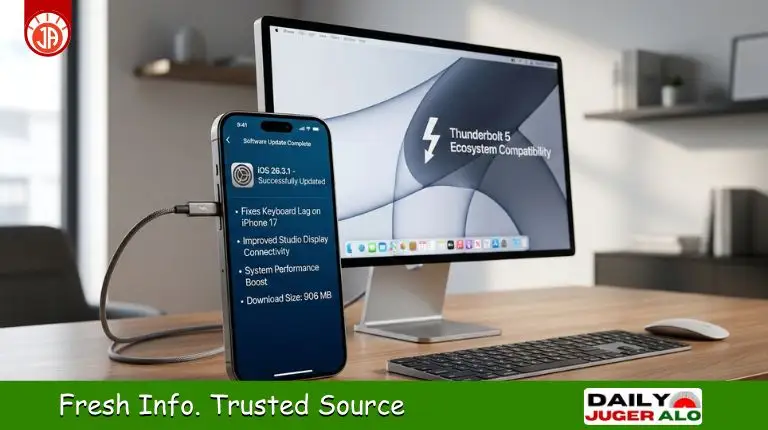
Apple officially released a new patch to enhance system stability. The latest iOS 26.3.1 Features include critical bug fixes and refinements that address issues from the previous version. This update is essential for keeping your iPhone running smoothly.
Apple focused on resolving user frustrations like the keyboard lag. For a more responsive interface, the iOS 26.3.1 Update Download is now available and highly recommended.
This release ensures seamless compatibility with Apple’s newest hardware. Installing this update provides a boost in typing speed and overall system fluidity.
What is New in iOS 26.3.1 Features?
Although iOS 26.3.1 is categorized as a minor update, it brings several vital under-the-hood refinements. This version does not introduce major visual overhauls; instead, it optimizes how the software interacts with Apple’s latest hardware. The most important iOS 26.3.1 features revolve around peripheral compatibility and system responsiveness that users should know.
Key Improvements in iOS 26.3.1
Apple has prioritized the following areas in this release:
- Studio Display connectivity improvements: Enhanced support for the latest 5K monitors.
- Keyboard lag fix on iPhone 17: Restoring real-time typing response.
- Interface stuttering issue resolved: Smoothing out UI animations.
- System stability improvements: Better background process management.
Apple iOS 26.3.1 Bug Fixes: What Problems Were Resolved?
The core of this update is the resolution of major bugs addressed in this release. Apple has specifically targeted issues that hindered the premium experience of the latest iPhones.
iPhone 17 Keyboard Lag Fix
One of the most widespread complaints was the keyboard delay issue. This was caused by a synchronization error between the touch-sampling rate and the UI layer. Apple addressed the problem by optimizing the input buffer, significantly impacting typing speed and user experience for the better.
Interface Stuttering and Performance Fix
In iOS UI, “stuttering” refers to small frame-rate drops during animations. This update provides a resolution for these jitters, resulting in improvements in animation smoothness and better responsiveness across all native apps.
iOS 26.3.1 Security Update: Why This Update Matters
While Apple confirmed there are no new CVE entries, the iOS 26.3.1 Security Update remains critical. Regular security patches are vital for iPhone users as they protect against potential vulnerabilities. Maintaining the latest version ensures your device stays compatible with Apple’s high security standards.
(Table Idea: Security Fix Category vs Impact)
| Category | Impact | Status |
| Core OS Stability | High | Improved |
| App Sandboxing | Medium | App Sandboxing |
| Vulnerability Patches | Critical | Up-to-date |
Studio Display Connectivity Improvements Explained
Many users previously experienced issues while connecting their iPhones to the Studio Display. iOS 26.3.1 improves compatibility significantly, providing benefits for professional users and creators who rely on Thunderbolt 5-enabled accessories.
iOS 26.3.1 Supported Devices
This update is compatible with iPhones released since 2019.
| Device | Supported |
| iPhone 17 Series | Yes |
| iPhone 16 Series | Yes |
| iPhone 15 Series | Yes |
| Older supported models (11, 12, 13, 14, SE) | Yes |
iOS 26.3.1 Update Download: How to Install It on Your iPhone
Updating your device is quick and easy. Follow these steps:
- Open Settings
- Go to General
- Tap Software Update
- Download and Install iOS 26.3.1
Why Many iPhone Users Were Waiting for This Update
Before this release, common user complaints centered around keyboard lag and UI stuttering frustrations. With performance expectations high, iOS 26.3.1 aims to restore the fluid feeling that Apple users expect from their hardware.
Performance Improvements After Installing iOS 26.3.1
- Faster keyboard response.
- Smoother UI animations.
- Improved system stability.
- Reduced minor glitches.
Should You Install iOS 26.3.1 Immediately?
Given the Apple iOS 26.3.1 Bug Fixes, this update offers several advantages:
- Pros: Security improvements, critical bug fixes, and better overall performance.
- Considerations: Ensure you have about 1GB of free space and always perform a backup before installation.
iOS 26.3.1 vs Previous Version: What Changed?
| Feature | Previous Version | iOS 26.3.1 |
| Keyboard Performance | Lag reported | Fixed |
| Studio Display Support | Limited | Improved |
| Security Fixes | Basic patches | Updated |
Future Impact: What iOS 26.3.1 Means for Apple Users in 2026
Regular incremental updates show how Apple is improving stability before the next major iOS release. This sets a strong foundation for the iPhone 17 and future devices within the Apple ecosystem.
Frequently Asked Questions (FAQ)
1. Is iOS 26.3.1 safe to install on iPhone 17?
Yes, iOS 26.3.1 is a stable public release specifically optimized to fix early performance bugs on the iPhone 17 series, making it highly recommended for installation.
2. Does iOS 26.3.1 fix the keyboard lag issue?
Absolutely. One of the primary fixes in this update is addressing the touch-input latency and keyboard lag that many users reported in the previous iOS 26.3 version.
3. What is the download size of iOS 26.3.1?
The update size is approximately 906 MB for most modern iPhones, though it may vary slightly depending on your specific model.
4. Are there any new security patches in iOS 26.3.1?
Apple has confirmed that there are no published CVE security entries for this update. It focuses entirely on system stability, performance, and hardware compatibility.
5. How does iOS 26.3.1 affect battery life?
Early feedback suggests that battery performance remains stable or slightly improved due to the resolution of background system glitches and interface stuttering.
6. Does iOS 26.3.1 support the new Studio Display (2026)?
Yes, this update is mandatory for users who want full ecosystem compatibility and seamless connection with Apple’s latest Studio Display and Studio Display XDR models.
Conclusion: Is iOS 26.3.1 a Must-Install Update?
In conclusion, iOS 26.3.1 is an essential update focusing on stability and responsiveness. By addressing the iPhone 17 Keyboard Lag Fix and enhancing peripheral support, Apple ensures that your device remains secure and stable. We highly recommend all eligible users to install the update today.
Disclaimer: This report is based on current release data. Always ensure your device is backed up before updating.